
Hello Magento Lovers,
I’m back with small issue fix for SEO help on magento. some time your SEO person asked you to hide category name form product URL and you could not find the exact setting to hide the category name from product URL in magento.
In this tutorial , today i will tell you the settings to do for get this done without any hard code or else settings in htaccess file
Follow the following steps to hide category name from product page URL in magento
Step 1 : Login to your magento admin panel.
Step 2: Go to system -> configuration -> catalog settings
Step 3: In Search engine optimization settings just make set ‘ No ‘ to the option in ‘ use categories path for product URLs
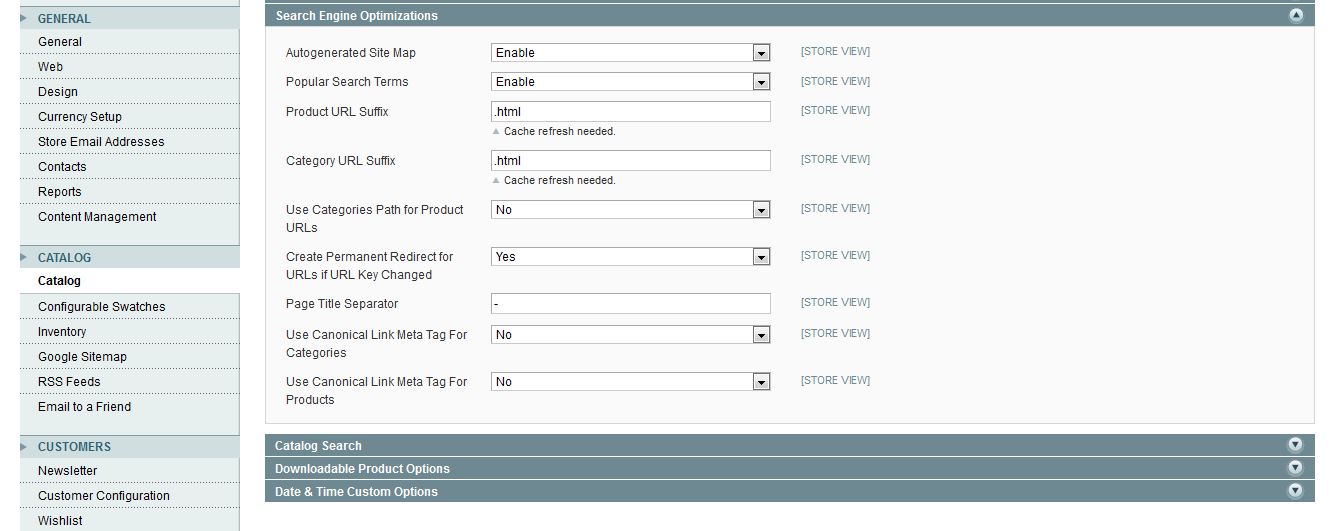
Step 4: Save the settings.
Step 5 : re-index the URls and flush the cache and check the URLs after ctrl+f5 refresh on frontend of your store 🙂
Thank you for reading.Please comments your queries.
Is Your Magento Store Secure?
Vulnerabilities like CosmicSting and SessionReaper are actively exploited. Scan your website in seconds to detect malware, exposed endpoints, and missing patches.
Run Free Security Scan on MageArgus →
Fact-Checked & Verified by W3ctrl
This content has been written and reviewed by Adobe-Certified Technical Experts with over 16 years of experience in Enterprise Architecture.

