
Finally good news for Magento lovers because now magento 2.0.0 community editions is available for donwload and install with sample data on magento developer hub website.
In the new version of magento 2 lots of things are new and also magento 2 have some different file structure and functionality . so if you are installing it first time then you will face some issue related to your server configuration or php extension.
Today here in this post i will show you how to install magento 2 step by step .
How to install magento 2 step by step
Step 1. First you need to donwload latest magento 2 version from magento website. you can select magento 2 archive from there with also sample data.
Link for download magento 2
https://www.magentocommerce.com/download
After donwload extract it on your server or local server (wmap server or xamp server)
Step 2. Magento changed it’s installation process in magento 2.Clink on readness check to check your server and php configration are suitable for magento 2 or not.if you found issue in php setting check and php extension check . then you need to fix those issue .

Here i will tell you how to fix those issue.
PHP version Check issue magento 2 installation
Issue : Your current setting of xdebug.max_nesting_level=100. Magento 2 requires it to be set to 200 or more.
How to fix : Just edit .htaccess file from your magento directory and add this line at the bottom of file.
php_value xdebug.max_nesting_level 200
save your file, restart web server, and try again.
Issue: PHP Extension check
1 missing PHP extensions. Hide detail
The best way to resolve this is to install the correct missing extensions. The exact fix depends on our server, your host, and other system variables.
How to fix : open php.ini file and find extension=php_intl.dll and remove comma from start and save file.
if you still get same issue then check php_intl.dll file in wamp\bin\php\php5.5.12 , if file missing download it and paste it here.
If you still get same issue then copy files from
Go to wamp\bin\php\php5.5.12 and copy all icu***.dll and paste them into apachae/bin.
After those changes restart your wamp or xmap server and again reload this page for readness check. you will get this screen and now lick on next.
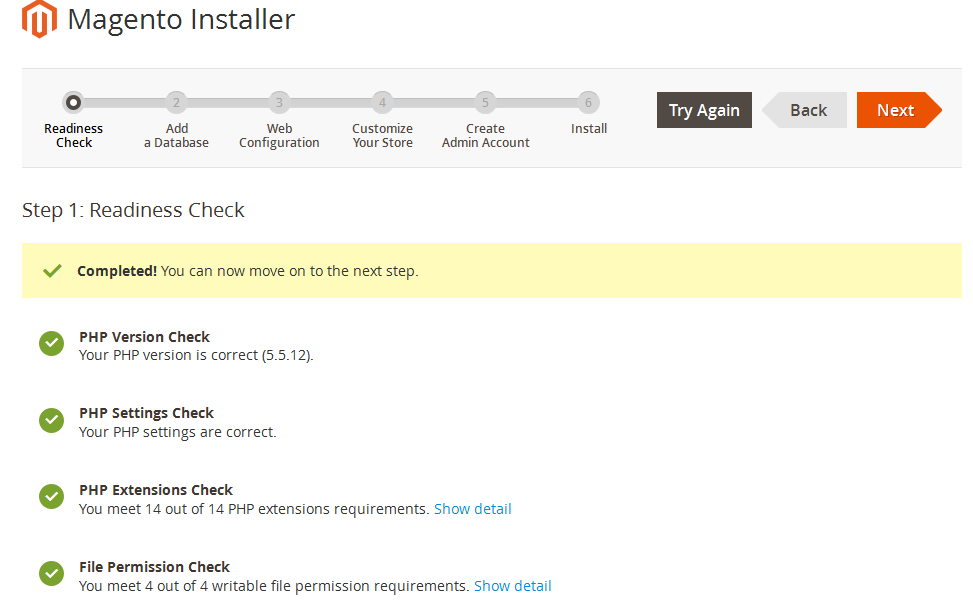
Step3 . In next step provide your database details.

Step 4. Provide your magento url details.

Step 5. Provide details for your store
Step 6. Create admin account

Step 7. Now it will take time depend on your server and sample data. so please take some coffee

Step 8. All done 🙂 Enjoy

Note : If you have css missing issue on front page and 404 error page not found issue on magento 2 admin page. then just enable rewrite url module from your apache server .
apache -> apchae modules -> click on rewrite module and enable it.
restart wmap server and check now everything is working fine. If you still get any issue comment here.
Is Your Magento Store Secure?
Vulnerabilities like CosmicSting and SessionReaper are actively exploited. Scan your website in seconds to detect malware, exposed endpoints, and missing patches.
Run Free Security Scan on MageArgus →
Fact-Checked & Verified by W3ctrl
This content has been written and reviewed by Adobe-Certified Technical Experts with over 16 years of experience in Enterprise Architecture.


8 Comments.
homepage working fine but other pages getting 404 error
please active rewrite mode from apache from your wmap server and re-index all URL(s) from magento Admin panel. It will work 🙂
Hey, i am on step1, and there is an issue ” PHP Extensions Check(
1 missing PHP extensions)” and i am working on cpanel, what i do to solve this one issue, and there is no option to go back…on php files.. please help me
Hello mani,
As per my view
1. Best solution is install and upload magento on server.
2. Second way if you wanna install on cpanel, then plz follow those steps. You can use putty to those folders on server.
How to fix : open php.ini file and find extension=php_intl.dll and remove comma from start and save file.
if you still get same issue then check php_intl.dll file in
binphpphp5.5.12 , if file missing download it and paste it here.
If you still get same issue then copy files from
Go to binphpphp5.5.12 and copy all icu***.dll and paste them into apachae/bin.
After those changes restart your wamp or xmap server and again reload
this page for readness check. you will get this screen and now lick on
next.
i did all those things but still website not lording ??
can you help me
please check rewrite mode from apache. clear all cache and re-index all URL
Thank you, I’m very happy, Great solutions
Thank you for reading. I’m also very happy 🙂